
Empowering Youth in Technology
A seminar on “Empowering Youth in Technology” was held by Spiralogics International, at Hotel Aryal, New Baneshwor, Kathmandu.


The seminar mainly focused on empowering the Nepalese youth for greater achievements. Educationalists, technology leaders, and young innovators as mentioned below came under a same roof and discussed how to minimize the gap that exists between education system and the IT industry.
- Abhijit Gupta,
- Saunak Ranjitkar, Chief Technology Officer, Spiralogics (Download Presentation)
- Krishna Pd. Upadhyay, MD, Spiralogics
- Prof. Dr. Mana Pd. Wagley, Renowned Educationist, Former Dean of KU (Download Presentation)
- Matthew Stonehouse, Business Analyst
- Romkant Pandey, VP of CAN Federation, TU Lecturer
- Niraj Shrestha, CEO, EeposIT
The program started with the Managing Director of Spiralogics, Mr. Krishna Prasad Upadhyay, saying greetings and thanking the participating guests. Meanwhile, the Operation Manager of Spiralogics, Mrs. Anukha Wagley welcomed the participants and highlighted on history of Spiralogics and the new beginning of Spiralogics Institute of Technology(SIT).


The program then continued with a speech from one of the leading and well known educationists, former Dean of KU, Prof. Dr. Mana Prasad Wagley. He emphasized on Nepal’s trending education system and its effectiveness in migrating students from education system to a professional workforce. Informing that a majority of the youths in Nepal are only textbook-literate, Mr. Wagley stressed the need to mix the country’s education system with IT to increase youths participation in IT sector.

Addressing the seminar, Mr. Saunak Ranjitkar, the CTO of Spiralogics Inc, spoke about the challenges Nepalese youth face today in meeting expectations in the IT industry. “Spiralogics is not just an institution but a family.”, reckoned Mr. Ranjitkar. He noted the continuous investment Spiralogics has made in the youth of Nepal since 2009. He said, “The vision for Spiralogics Institute of Technology was born from years of successes and failures I had experienced.” He continued that SIT would play a vital role in filling the gap that students faced when migrating from academia to the industry. He also talked about the opportunities that “Spiralogics Institute of Technology” offers; to help, learn, and build a strong IT industry in Nepal.

The next speaker, Matthew Stonehouse, one of the business analysts working with Spiralogics, discussed the benefits of youth innovation in Nepal. He said that the youth will always have bigger opportunities in the IT sector as compared to other sectors as IT is an ever-growing industry in the present context. The seminar then proceeded with the insights of Romkant Pandey, the Vice President of CAN and TU Lecturer, on “Gap between academia and industry”. He added that the gap persisted on the collaboration between academia and industry and how, we should find solutions to mitigate this very gap.

The seminar was officially concluded by presentation on ICT (Information Communication Technology) opportunities for young and newbies by Mr. Abhijit Gupta. Mr. Gupta tried my best to express the opportunities and possibilities in ICT market of Nepal. Mr. Gupta tried to motivate them.

Together we achieve more.

Push yourself because no one else is going to do that for you.
He pointed to the need of each one of the youths to be focused on pushing oneself for greater achievements.


How ICT is changing our lives
On 29-Jan-2016, an article was written by Ms. Kriti Bhuju where Mr. Abhijit Gupta was interviewed on “How ICT is changing our lives”.
Abhijit Gupta, managing director of Rapid Web Solutions, highlighted the need to implement eServices as much as possible to increase transparency, faster service, ease of use, and dependency to further expand ICT in Nepal. “Nepal needs to make big investment in Internet services, satellite and security, and to produce human resources for data centre,” said Gupta.
http://admin.myrepublica.com/economy/story/36023/how-ict-is-changing-our-lives.html
Lack of skilled workforce hindering growth of IT industry
On 28th Sep, 2015, an article was written by Ms. Kriti Bhuju for My Republica. One of the interview before writing this article was held at Rapid Web Solutions office.
Raju Gurung has been working as a software developer at Rapid Web Solutions for the past two years. “The industry is all about creativity, learning new technology, and getting oneself updated. Necessary trainings would enable one to enter IT sector even if s/he does not university degrees in IT,” he said. “However, one must have passion and a great deal of enthusiasm.”
Abhijit Gupta, managing director of Rapid Web Solutions, agreed with Gurung and said one needs to be smart enough, should be self-motivated and creative. “We actually do not need people with degrees in IT. We need brains that can tackle and adjust with the demand of the market, and upgrade themselves to the need of the clients,” Gupta said, adding that practical experience is what that matters must.
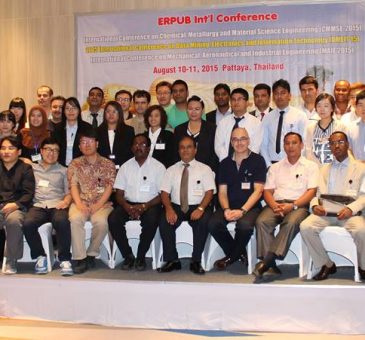
ERPUB DMEIT’15
On Aug 10, 11, 2015, International Conference on Data Mining, Electronics and Information Technology (DMEIT’15) was held by ERPUB (Emirates Research Publishing) in Pattaya, Thaliand.
There were participants from all over the world. The conference was an absolute learning platform where one could learn about different subjects and researches.

Mr. Abhijit Gupta presented his research paper on “E-Readiness Assessment for Ministries of Nepal for Implementation of E-Government”. The other authors of the paper were Mr. Shreedhar Marasini and Prof. Dr. Subarna Shakya. Prof. Dr. Subarna Shakya was also a mentor, instructor and supervisor on this research.
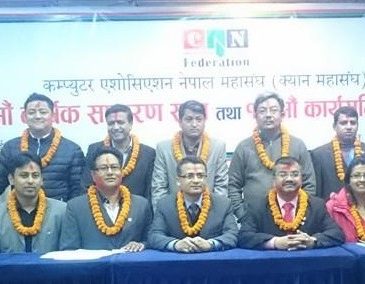
CAN Federation Election 2015
क्यान महासंघको अध्यक्षमा विनोद ढकाल विजयी भएका छन् । आइतबार राती भएको भएको महासंघको पहिलो निर्वाचनमा ढकालले प्रतिद्धन्दी उम्मेदवार एवं क्यानका निवर्तमान् द्धितिय उपाध्यक्ष नारयण न्यौपानेलाई पराजित गरेका हुन् ।
ढकालले ५५.६७ प्रतिशत र न्यौपानेले ४४.३३ प्रतिशत मत पाए । निवर्तमान् अध्यक्ष समेत रहेका ढकालले आफ्नै कार्यकालमा क्यानलाई महासंघको परिणत गराएका थिए । जितपछि लिभिङ विथ आइसिटीसँग बोल्दै अध्यक्ष ढकालले यो जित सम्पूर्ण सूचना तथा सञ्चार प्रविधि क्षेत्रको भएको बताउँदै क्यान महासंघलाई एकताबद्ध रुपमा लैजाने प्रण गरे । ‘यो जित आइसिटीलाई माया गर्ने सबैको हो । म र मेरो प्यानललाई अमूल्य मत दिई विजयी गराउनु भएकोमा सम्पूर्ण साथीहरुलाई धन्यवाद दिन चाहन्छु’, उनले भने ।
निर्वाचनमा ढकाल प्यानलका २७ मध्य २३ जनाले जितेका छन् । संस्थागत सदस्य समूह ५ मा ५ जना नै, संस्थागत आजीवन २ मा २ जना नै, ब्यक्तिगत आजीवन सदस्य २ मा २ जना नै, जिल्ला शाखाहरुको तर्फबाट १० जनामा ६ जना, बिषयगत २ मा २ जना नै निर्विरोध निर्वाचित र ब्यक्तिगत सदस्य समूहको ५ जनामा ५ जना नै विनोद ढकाल समूहको तर्फबाट बिजयी भएका छन् । नारायण न्यौपानेको प्यानलबाट जिल्ला शाखामा १० मध्ये ४ जना विजयी भएका छन्, जसमा नवराज कुँवर (निर्विरोध), अशोक बाबु राना, रेशम गिरि, श्यामकल श्रेष्ठ रहेका छन् । अन्य क्याटगोरीमा आएको नतिजा :

संस्थागत सदस्यतर्फ विजयी
विनोद ढकालको प्यानल- हेमन्त चौरासिया, विश्व बलामी, रंजित पोदार, सुनैना पाण्डे र अरुण बंशल
व्यक्तिगत सदस्यतर्फ विजयी
विनोद ढकालको प्यानल- भिमध्वज श्रेष्ठ, रोमकान्त पाण्डे, खुशल रेग्मी, रेगबहादुर भण्डारी र अभिजित गुप्ता
संस्थागत आजिवन सदस्यतर्फ विजयी
विनोद ढकालको प्यानल- वीरेन्द्र बज्राचार्य र सन्देश गोपाल न्याच्छयो
व्यक्तिगत आजिवनतर्फ विजयी
विनोद ढकालको प्यानल – हेमपाल श्रेष्ठ र पवन कुमार शर्मा
बिषयगत सदस्य तर्फ विजयी
बिनोद ढकालको प्यानल – सुमनलाल प्रधान र नारायण बहादुर थापा
क्षेत्रिय सदस्य तर्फ विजयी
बिनोद ढकालको प्यानलबाट : दिपेश पाठक (पूर्वाञ्चल), ठाकुर श्रेष्ठ (पूर्वाञ्चल), शेखर दुलाल (मध्यमाञ्चल) र संजय थापा (मध्यपश्चिमाञ्चल),
नारायण न्यौपानेको प्यानलबाट : श्यामकल श्रेष्ठ (मध्यमाञ्चल), अशोकबाबु राना (पश्चिमाञ्चल) र रेशम गिरि (मध्यपश्चिमाञ्चल)
निर्विरोध – टेकराज पनेरु (सूदुरपश्चिमाञ्चल), सुनिल दत्त ओझा (सूदुरपश्चिमाञ्चल) र नवराज कुँवर (पश्चिमाञ्चल)
Custom php.ini file
If you need some custom PHP settings for any of your directories you will need to use a custom php.ini file. Please note that the custom php.ini file you create is only valid for the directory you upload it in. The php.ini file is a normal text file created with your text editor. In that file you must put only the changes you need done. For example, if you want to enable register_globals for one directory you must create a php.ini file and put the following line in it.
register_globals = On
If you want to have the changes for all your subdirectories under public_html you should upload the php.ini in your public_html folder and add the following line to .htaccess:
SuPHP_ConfigPath /home/username/public_html/php.ini
Replace username in the path above with the cPanel username of the account you are setting up the php.ini for. Once you do the changes you can verify if it works by uploading a php script info.php with the following content in it:
<? phpinfo(); ?>
If you want to add extensions, you can add it in following ways
extension=pdo.so
extension=pdo_sqlite.so
extension=sqlite.so
extension=pdo_mysql.so

Install and Activate new Magento Theme
Magento theme installation is quick and easy. This will be accomplished in just 3 simple steps.
Step 1: Download a Theme
Thousands of themes can be found with a simple Google search. Download the theme in zip format to your computer, and unzip it.
Step 2: Upload a Theme
After unzipping your theme, you’ll want to upload it to your web hosting server. Depending upon the Theme you choose you will see at least 2 folders.
/app
/skin
Note: Some themes include a /js folder as well.
Connect to your web host via FTP, and upload them to the root of your website.
Step 3: Activate your Theme
Now, login to your Magento admin panel and choose System -> Configuration from the drop-down menu at the top of the page. On the left menu click on “Design”. Click on the “Themes” header to expand the section.
You will see 5 fields:
- Translations
- Templates
- Skin (Images / CSS)
- Layout
- Default
These fields are where you will add your theme name. The first field “Translations”, is usually kept blank unless you are using an alternate language.
Lets say we downloaded a style named Blue, enter “blue” into the Templates, Skin, Layout, and Default fields and click Save Config. The name of the theme and the name you are entering in to each field will differ depending upon the theme you choose. Some themes will come with multiple colors so the fields may not all be the same name.
Now, go to the main page of your storefront, and admire your new theme!

WordPress Cheat Sheet
Theme Structure
header.php …………………. Header Section
index.php ……………………. Main Section
sidebar.php ……………….. Sidebar Section
single.php ………………….. Post Template
page.php ……………………. Page Template
comments.php ……………… Comment Template
search.php …………………. Search Content
searchform.php ………… Search Form Template
archive.php ………………. Archive Template
functions.php ……………. Special Functions
404.php ……………….. Error Page template
style.css …………………….. Style Sheet
BlogInfo Tags
<?php bloginfo(‘name’); ?> ………………………Title of the blog
<?php bloginfo(‘charset’); ?> ……………………The character set
<?php bloginfo(‘description’); ?> ……….The description of the blog
<?php bloginfo(‘url’); ?> ………………….The address of the blog
<?php bloginfo(‘rss2_url’); ?> ………………………..The RSS URL
<?php bloginfo(‘template_url’); ?> ………….The URL of the template
<?php bloginfo(‘pingback_url’); ?> ………………..The pingback URL
<?php bloginfo(‘stylesheet_url’); ?> The URL for the template’s CSS file
<?php bloginfo(‘wpurl’); ?> ………….URL for WordPress installation
<?php bloginfo(‘version’); ?> ….Version of the WordPress installation
<?php bloginfo(‘html_type’); ?> ……………HTML version of the site
BlogInfo Tags
is_home() …………………..When the user is on the blog home page
is_front_page() ………………….When the user is on the home page
is_single() …………………………When the single post displayed
is_sticky() …………………………….Check if a post is sticky
is_page() ……………………………….When a page is displayed
is_category() …………………………When a category is displayed
Theme Definition
/*
Theme Name: WordPress
Theme URI: http://wordpress.org/
Description: Test Blog
Version: 1.6
Author: Ekin Ertaç
Author URI: http://ekinertac.com
Tags: powerful, cheat, sheet
*/
WordPress Template Tags
<?php the_title() ?> …………………Displays the posts/pages title
<?php the_content() ?> …………Displays the content of the post/page
<?php the_excerpt() ?> ….Displays the excerpt of the current post/page
<?php the_time() ?> ……….Displays the time of the current post/page
<?php the_date() ?> …..Displays the date of a post or set of post/page
<?php the_permalink() ?> ………….Displays the URL for the permalink
<?php the_category() ?> ……………..Displays the category of a post
<?php the_author(); ?> ………………Displays the author of the post
<?php the_ID(); ?> ……….Displays the numeric ID of the current post
<?php wp_list_pages(); ?> ……………………Displays all the pages
<?php wp_tag_cloud(); ?> ………………………Displays a tag cloud
<?php wp_list_cats(); ?> ……………………Displays the categories
<?php get_calendar(); ?> ……………………..Displays the calendar
<?php wp_get_archives() ?> ……….Displays a date-based archives list
<?php posts_nav_link(); ?> …Displays Previous page and Next Page links
<?php next_post_link() ?> …………………Displays Newer Posts link
<?php previous_post_link() ?> ………………..Displays previous link
<?php edit_post_link(__(‘Edit Post’)); ?> ……..Displays the edit link
<?php the_search_query();?> …………….Value for search form
<?php wp_register();?> …………….Displays the register link
<?php wp_loginout();?> …………..Displays the log in/out link
<?php wp_meta();?> …………………..Meta for administrators
<?php timer_stop(1);?> …………………Time to load the page
<?php echo c2c_custom(‘test’);?> …… Displays the custom field1
<?php get_links_list(); ?> ………..Display links from Blogroll
<?php get_calendar(); ?> ……….Displays the built-in calendar
<?php comments_popup_link(); ?> …….Link of the posts comments
The Loop
<?php if(have_posts());?>
<?php while(have_posts()); the_post();?>
// The Stuff… Custom HTML & PHP Code
<?php else;?>
<?php endif;?>
The Category Based Loop
<?php query_posts(‘category_name=
Category&showposts=10’); ?>
<?php while (have_posts()) : the_post(); ?>
// The Stuff… Custom HTML & PHP Code
<?php endwhile;?>
Template Include Tags
< ?php get_header(); ?>
< ?php get_sidebar(); ?>
< ?php get_footer(); ?>
< ?php comments_template(); ?>
Navigation Menu
Category Based Navigation
<ul id=”menu”>
<li <?php if(is_home()) { ?>< ?php } ?>>
<a href=”<?php bloginfo(‘home’); ?>”>Home</a></li>
< ?php wp_list_categories(‘title_li=&orderby=id’); ?>
</ul>
Pages based Navigation
<ul id=”menu”>
<li <?php if(is_home()) { ?>< ?php } ?>>
<a href=”<?php bloginfo(‘home’); ?>”>home</a></li>
< ?php wp_list_pages(‘sort_column=menu_order&depth=1&title_li=’); ?>
</ul>
1: the <?php echo c2c_get_custom(‘test’) ;?> is working with Scott Reilly’s great Plug-in “Get Custom Field Values”
Sources: WordPress Codex
Author: Ekin Ertaç
Author URL: www.ekinertac.com
Version: 1.0
Description: Complete WordPress Cheat Sheet

Viva
Subtitles updated, Please click on the captions button to enable it. Hope you will enjoy the video. Have a great time.
Funny Commercials
Recent Posts

March 18, 2026 - 0 comments

December 14, 2025 - 0 comments

September 25, 2025 - 0 comments

July 6, 2024 - 0 comments

May 14, 2021 - 0 comments

May 12, 2021 - 0 comments

May 11, 2021 - 0 comments

May 6, 2021 - 0 comments

May 2, 2021 - 0 comments

April 30, 2021 - 0 comments

April 29, 2021 - 0 comments

November 21, 2019 - 0 comments

November 21, 2019 - 0 comments

November 21, 2019 - 0 comments

November 19, 2019 - 0 comments

November 19, 2019 - 0 comments

November 19, 2019 - 0 comments

November 19, 2019 - 0 comments

November 15, 2019 - 0 comments

November 15, 2019 - 0 comments

November 14, 2019 - 0 comments

November 14, 2019 - 0 comments

November 12, 2019 - 0 comments

November 12, 2019 - 0 comments

November 11, 2019 - 0 comments

November 11, 2019 - 0 comments

November 8, 2019 - 0 comments

November 8, 2019 - 0 comments

November 7, 2019 - 0 comments
November 7, 2019 - 0 comments